Fossil Hybrid HR Review: Hybrid Lifestyle

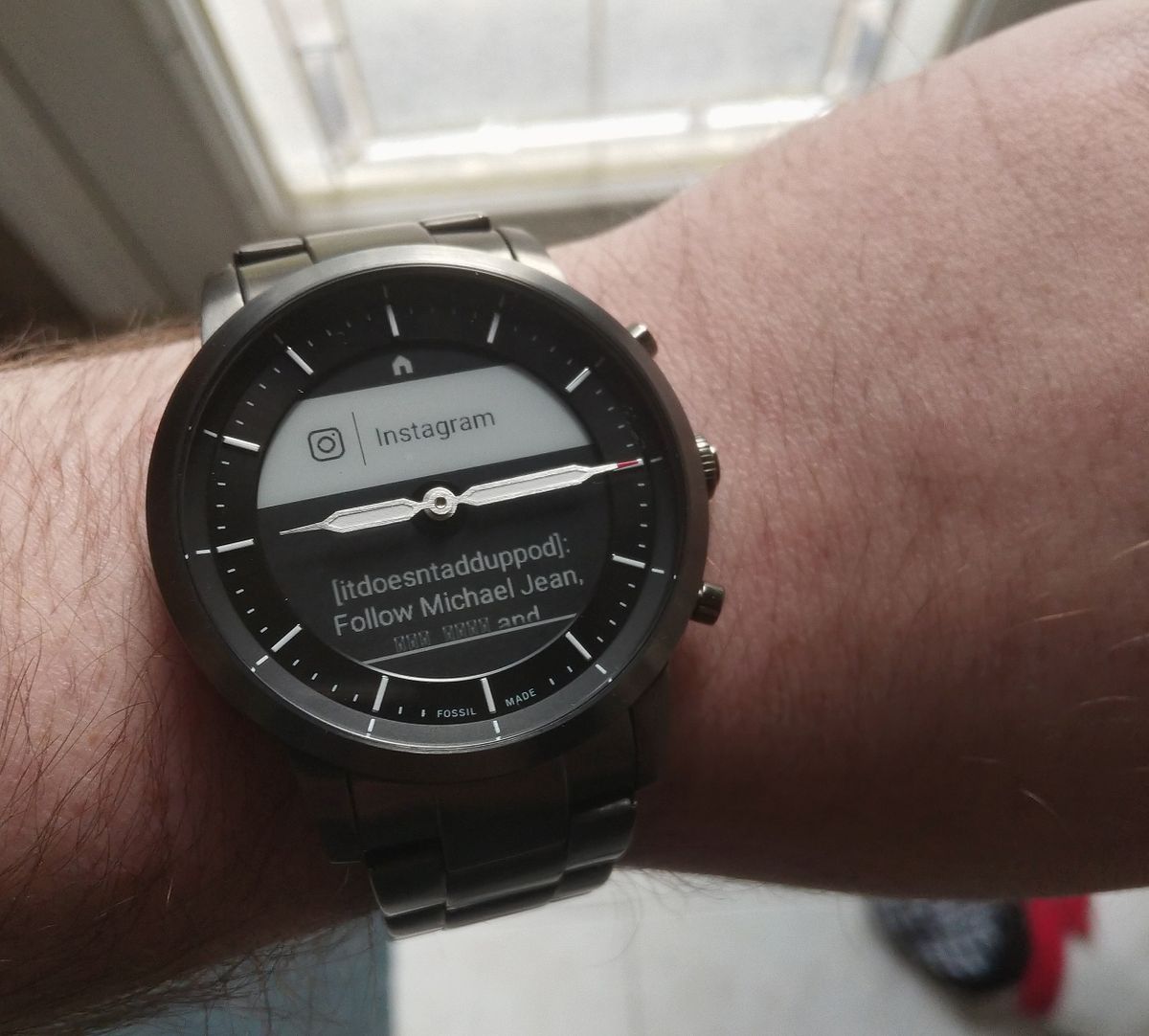
The Fossil Hybrid HR aims to blend the feature set of a smartwatch in a covert design that, from the outside, appears to be nothing more than a stylish analog watch. In order to combine the two, compromises have to be made. The good news is that this trade-off allows for some pretty stellar benefits as well.
E-Ink on the Go
The Fossil Hybrid HR sports a circular E-Ink display beneath the watchface for its UI, menus, and of course: notifications from your phone.
I’ve written about E-Ink quite a bit, so here’s a quick rundown of how it works in relation to the Hybrid HR. The display looks just like black ink on paper. This high contrast is super sharp and easy to read. Text, the main purpose of E-Ink, is right at home on the watch and is crystal clear. This means your notifications can be quickly glanced at and understood, just as they should be on a smartwatch-like device, with as little interference as possible.
E-Ink also means that the Hybrid HR is power efficient. I mean really efficient. I’ve had the watch for a little over a month and (after the initial setup charge) I have only needed to charge this thing exactly once. That second charge currently sits at 26%, so I might need to charge it sometime next week. Maybe. It’s quite liberating to have a device that’s in use all day, everyday, and not have to worry whatsoever about its battery.
Why Hybrid?
So what exactly can the Fossil Hybrid HR do? And perhaps crucially for your needs, what can it not do? The Hybrid is not a full featured smartwatch like Fossil’s Gen 5 Android Wear OS device line. It doesn’t have apps, the E-Ink display inlaid in the watchface isn’t a touch screen. It doesn’t have GPS or its own WiFi connection. Cellular? Forget about it. No speakers, no microphone either, so no smart assistant functionality.
That all might sound pretty limiting, right? Why not get a “real” smartwatch that can just do more? That’s exactly the point of the Hybrid HR. It’s not designed to handle everything. But what it does do, it handles well and in a discreet, gorgeous package.
Notification Nation

The Hybrid HR connects to your phone using Bluetooth Low Energy to send phone notifications to the watch. Originally, a minuscule list of apps were supported, along with text messages, calls, emails, and calendar alerts. Fortunately, a week after I had the watch (this was in mid-December), a firmware update rolled out that allowed the Hybrid HR to receive notifications from any app on your phone. You can customize which apps are allowed to send notifications to the watch using Fossil’s Hybrid app, which is used for the initial setup as well as updates, settings, fitness tracking, and some other customization features I will get into.
Notifications also trigger a gentle vibration from the watch. It is much less harsh than a phone vibration alert, coming in two small bursts. I’ve found it is just enough to get your attention, and not so boisterous that those around you will even notice. Even with a series of rapid notifications rolling in the vibration hasn’t annoyed me yet, which I think is a testament to the subtle nature of the Hybrid HR.
Customizing the Hybrid HR
Without a touchscreen, the only way to interact with the watch is with the three buttons to the right of the case that mimic dials. The large center button acts as select and when you hold it for a second, it will take you back to the home screen from a menu or other function. The other two buttons will be used to move throughout menus and functions and to scroll notifications.
You are also able to assign shortcuts to all three buttons using the Fossil Hybrid app. For example I have my center button on the default “recent notifications” setting, so it opens notifications I haven’t cleared from the watch. My top button is media playback control, and my bottom button is weather forecast, which the Hybrid HR pulls from your phone.
The Fossil Hybrid app allows you to customize the home screen as well. The home screen contains four circles with useful information like the date, the weather, your daily steps, and current heart rate (guess what the HR in Hybrid HR is for?). You can control what you’d like to see on your watch face and the order of the circles, though the circles are always arranged in the same diamond pattern.
The app gives you the option to change the background design of the face, giving you a small selection of some neat designs that in my opinion all look rather nice on the e-ink display. Better yet, that nifty December update gave us the ability to create our own backgrounds in the app by uploading our own pictures. Experiment away.


Fitness Phobic
The Fossil Hybrid HR has fitness features, but it would be a stretch to consider it a fitness-focused device. As mentioned, it tracks heart rate, and can also track your sleep. I tested it once, the first night I had the watch, and it appeared to work well. The watch tracked light and deep sleep, as well as when I got up, and continued to monitor my heart rate throughout the night. However, as I went with the Collider stainless steel style, it wasn’t especially comfortable to sleep with so I have not made it a habit to go to bed wearing it.
Fitness stats are tracked in the Hybrid app which in turn can be connected to Google Fit or Under Armor Record if those are your fitness apps of choice. There is a dedicated workout function as well to track specific instances, there’s a timer and stopwatch here too. Another drawback that must be mentioned here is that the Hybrid HR is only rated water-resistant for hand washing. So if you get caught in the rain or clean up, your watch will be just fine. Just don’t take it for a swim when you’re going to do laps. All in all, if you are looking for a fitness wearable, there are better suited options out there. I consider the fitness features here a nice bonus.
Let There Be Light
There are a few other downsides to the Hybrid HR. Some are on the software side and a couple are related to the hardware.
While the Hybrid’s e-ink screen excels in the daytime or in rooms with light, offering zero glare and amazing clarity that no other smart device can match, it does not have a backlight. Instead, much like e-readers, Fossil has installed a series of four front LED lights that are triggered by tapping twice on the watchface.
These lights get the job done fine enough. This is not the smooth, can’t-even-tell-where-the-lights-are-coming-from illumination of something like the Kindle Oasis and its twelve LEDs. But they will allow you to see the display in the dark, which is the point.
The problem is that the double-tap to activate them is not very responsive, and often you will be tapping the case several times in the dark until the lights decide to pop on. I have yet to find a decent trick to this, though I do believe tapping the center of the watch, where the hands of the clock meet, yields the best results. Ideally in an improved version of the Hybrid, the light distribution would be smoother, so there are no dark patches around the lights, and perhaps a dedicated button to trigger the front lights. At the very least, allowing users to map light functionality to one of the customizable buttons would be very welcome.
Software Stumbles
The few software wriggles I feel could easily be ironed out. The media controls menu is somewhat cumbersome to use. When you activate the media functionality, the controls themselves have to be opened. Only then are you allowed to control the volume, play previous track or skip, etc. Oddly, pause is available without going into the further settings. So why all the controls aren’t available immediately doesn’t make complete sense. Otherwise the media controls work quickly and without issue, but this extra step has prevented me from building the muscle memory of being able to control my music without looking at the watch display.

Another issue I have, that may be a big sticking point for some, is that clearing notifications from the Hybrid HR does not clear them from your phone. So when you go to pick up your phone, all the alerts you’ve already seen are still there waiting for you. This seems strange, because the Hybrid has some control over the phone.
For example, the Hybrid can answer phone calls for you when they come in. Obviously with no mic or speaker that’s all the watch can do, the phone has to handle the rest, but the watch tells the phone to pick up the call. Clearing notifications, that the device already has full access to, seems like a much more simple interaction. Then again, I’m not a computer engineer.
The Bottom Line: Hybrid HR
The Fossil Hybrid HR is ideal if you’re looking for a smartwatch that actually looks like a real watch, rather than a giant screen slapped to your wrist. Its display is subdued and elegant, and e-ink is the perfect tech for relaying text. The battery life is a dream too. The pared down feature set might be too much for some to overcome, and it is not a wearable for fitness junkies. That said, those in search of a discrete smartwatch to deliver notifications and retain most of the functionality of a full-featured smartwatch at a lesser price, the Fossil Hybrid HR is your target.
Buy Fossil Hybrid HR on Amazon: Buy Link