Review: Kindle Oasis 2, the Premium E-Reader

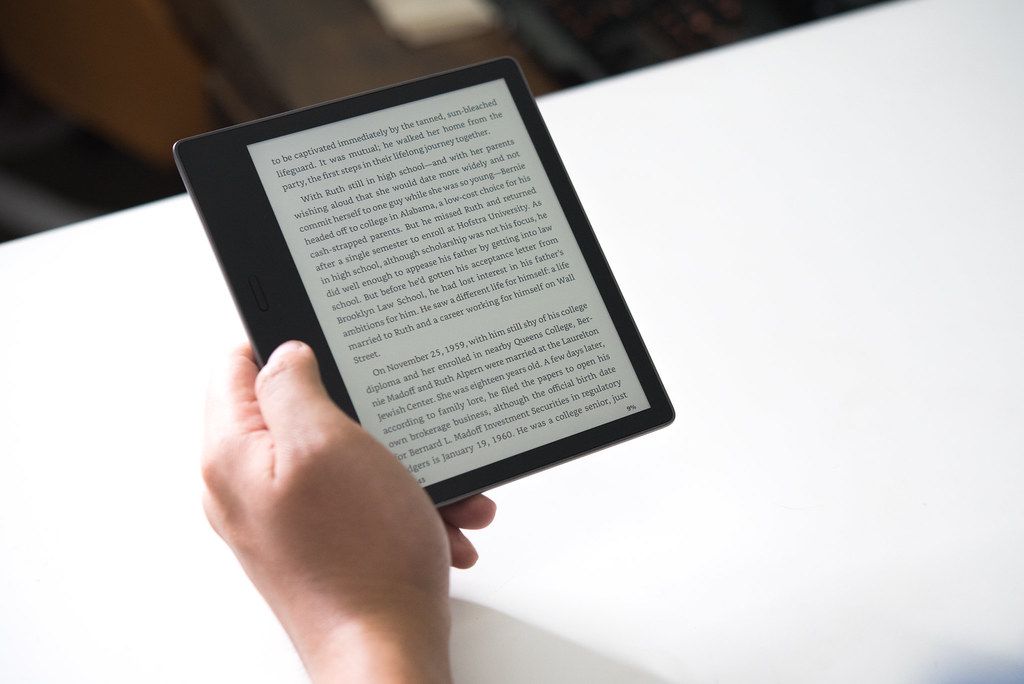
My torrid love affair with e-ink began when I picked up a Kindle Paperwhite (2015 model) last spring. I loved it, and used it so much that less than a year later I wanted to upgrade.
I considered a lateral move to the newest Paperwhite, but I’d only gain an additional LED front light, a screen flush with the bezels, and Audible audiobook support.
Instead, I thought that if I was going to upgrade, I should really upgrade. To do that, I looked to the Kindle Oasis, Amazon’s premium e-reader.
The Specs
The 2nd generation Kindle Oasis features a 7 inch, 300 dpi monochrome display, the largest screen available on a Kindle. The Kindle Paperwhite is also 300 dpi, but on a 6 inch screen. The newest Paperwhite screen is identical to its 2015 predecessor.
For front lights, Amazon gives us 12 LEDs, up from 5 in the new Paperwhite (4 for the old), for smooth illumination across the entirety of the larger screen. Accompanying these lights is an ambient light sensor. While the setting is on, the Oasis will adjust the brightness of the lights depending on the light in the room.
After playing around with it, I eventually turned this setting off. It never seemed to adjust when I wanted (or expected) it to. I would notice the brightness increase from 0 in a well-lit room. It’s also too easy to accidentally cover the sensor with a finger and suddenly have the Oasis crank the brightness when you’re in a well-lit room and don’t need the front light on at all.
Those 12 LEDs can get pretty bright as well. On my Paperwhite, I found “17” on the brightness scale to be perfect for reading at night. “17” on the Oasis is near-blinding for me. So “10” is now my go-to brightness setting. The lights spread perfectly evenly as well, you would think the screen is actually backlit.
Back on the old Paperwhite with only 4 lights, near the lights themselves were obvious dead zones that could be distracting when you got to the bottom of pages. On the Oasis the front lights are an afterthought, completely concealed, completely natural.
All models have WiFi to download books, access Wikipedia and translations, and kill battery life. If you have the cash to burn an Oasis model with contract-free 3g is available, but for my purposes (I almost always read in airplane mode) it would never be worth it.
The Oasis has an improved processor for faster page turns, UI navigation, and other screen refreshes. E-ink’s notoriously slower response time means any additional speed is very welcome. Though unless you’re upgrading from an older e-reader (and even then) you probably won’t notice the difference. I do recognize an improvement in page turn speed, but it’s not a dramatic difference over my old Paperwhite.
The base Oasis comes with 8gb of storage, doubling the capacity of the 2015 Paperwhite. Also available is a 32gb version. I didn’t come close to filling up 4gb worth of books, but I sprung for the increased storage all the same. I want this upgrade to be the last e-reader I’d need for a long time, and the possibility of storing audiobooks made more space seem like a good idea. Those uninterested in audiobooks, who don’t feel the need to carry around a literal digital library of thousands of titles, will be perfectly fine with the base 8gb.
Speaking of audiobooks, the newest Kindles are all equipped with Bluetooth, allowing users to connect to speakers, headphones, cars, and other audio devices to play Audible audiobooks. Kindles don’t have built-in speakers or headphone jacks, so if you want Neil Gaiman to read The Graveyard Book to you before bed, you’ll need to embrace wireless audio.
Pairing works as you would expect if you’re familiar with Bluetooth in any capacity. The Oasis screen will feature playback options, speed settings, etc. The interface is almost identical to the Audible mobile app interface. Users of the app should have no trouble playing audiobooks from a Kindle. Whispersync always keeps your place (provided your Kindle is online) so you can listen on your Kindle and then continue where you left off on your phone.
Battery Life
I’ve seen quite a bit of mixed responses to the battery life of the Oasis, but it seems to be all based on your usage case. Obviously if you’re running at a high brightness, listening to a lot of audiobooks, and leave the WiFi on, your battery is going to drain at a faster rate.
In my specific case, reading at a medium-ish brightness, always in airplane mode, my Oasis lasts weeks if not a couple of months between charges. So my advice? If you aren’t browsing the Kindle store, you aren’t translating, or looking anything up on Wikipedia, throw on airplane mode and you’ll never worry about battery at all. You’ll also get fewer ads that way.
I will say though that it does feel like the battery drains slightly faster than my Paperwhite did, especially when WiFi is on. I’d chalk this up to the number of LEDs as part of the front light array.

Design and Form-Factor
Forgoing the traditional slate-rectangle tablet design of previous Kindles and most e-readers, the Kindle Oasis sports an asymmetrical form-factor. The 7 inch screen is off to the side, with its nearest bezels trimmed very thin. On the other side the Oasis has two vertical buttons for page turns.
The back side of the Oasis is similarly asymmetrical: super thin under the screen and thicker on the side where the page turn buttons are. This allows the Oasis to be comfortably held in one hand. All the weight of the device is kept on this grip side, and the accelerometer inside means that the Kindle Oasis can be flipped to orientate being held in either hand.
This works exceptionally well too. I often swap hands, especially reading in a bunch of alternating positions in bed, and the Oasis has always switched exactly when I have flipped it and has never flipped the screen 180 degrees when I didn’t want to. I can’t say the same for the different tablets and phones I’ve used over the years. I’m sure you’ve had to tilt your devices every which way, feeling like a lunatic, to get them to orient the way you want.
You can even go into the settings and turn on landscape mode, allowing you to read with the page turn buttons towards the bottom, and with the magic of reflowable ebooks, your text will accomodate.
The asymmetrical form factor allows the screen to give off dimensions that I feel more closely resemble an actual page of a book. While the Paperwhites still have that excellent 300dpi screen, the dimensions and form factor mimic a traditional tablet. The Oasis as a whole is essentially a square, but the design gives the screen room to breathe.
Reading Experience
Reading on the Kindle Oasis is wonderful. It sounds elementary, but a larger screen means I can fit more words on a page while still being able to see them comfortably. With a larger screen you can limit the margins, make the font smaller, and really cram a lot of words into that 7inch display. I’m also reading faster: I’ve already read more books in 2019 than I did all of last year. I attribute this to more words on a page and the less frequent need to page turn.
But when I do turn a page? It’s lovely already having my thumb right there on the button. It doesn’t interrupt the flow of reading like reaching over and obscuring the screen with a finger to tab the edge to get to the next page. I just keep on reading. It’s these little niceties that add up and make the Oasis feel like a true improvement over the standard tablet Kindles.
The buttons give satisfying resistance to them, a light, soundless click so you know you’ve pressed it. I’ve yet to accidentally press a page turn button when I didn’t mean to, even when holding the Oasis with the weight shifted towards my thumb over the button.
The Kindle Oasis is all about reading comfort. You probably don’t read the same way I do, with fairly small text, at my level of brightness, in the twisting and turning positions I contort myself into. It doesn’t really matter. The Oasis will accommodate you. Its premium design and feature set allows it to have the range that the rest of the Kindle lineup can’t.
For me, the Kindle Oasis has been well worth that price tag.
Note: This review contains Amazon affiliate links to the products mentioned. I can receive a fee based on purchases made using these links. However, Amazon has not paid for this review. I wish Jeff Bezos was paying me to write about Amazon, but he doesn’t seem to like paying people all that much. My Kindle Oasis was purchased with my own money. View my privacy policy if you have any further questions.
.